How to make a Halloween Hotel Lobby AI video
Pick the Halloween booth in Hotel Lobby AI Studio, upload two costume photos, and pay $9.99. You get a 15-second vertical video with the original audio in about 6–8 minutes. Keep faces visible: full masks make you hard to recognize.
What does the Halloween Hotel Lobby booth look like?
The Halloween booth in Hotel Lobby AI Studio is a darker, Halloween-themed version of the booth with the same hanging mic and two-person framing.
Everything else works like the Original booth. Photo 1 stands on the left and photo 2 on the right. The video is 15 seconds long, vertical by default, with the original "Hotel Lobby" audio already in the file and the lips moving to it.
Your costumes do the rest. The AI builds each performer from your photos, so what you wear in the photo is what it has to work with.
Prefer the classic orange look? Your costumes carry over in the Original booth too. Pick Halloween when you want the setting to match the outfits.
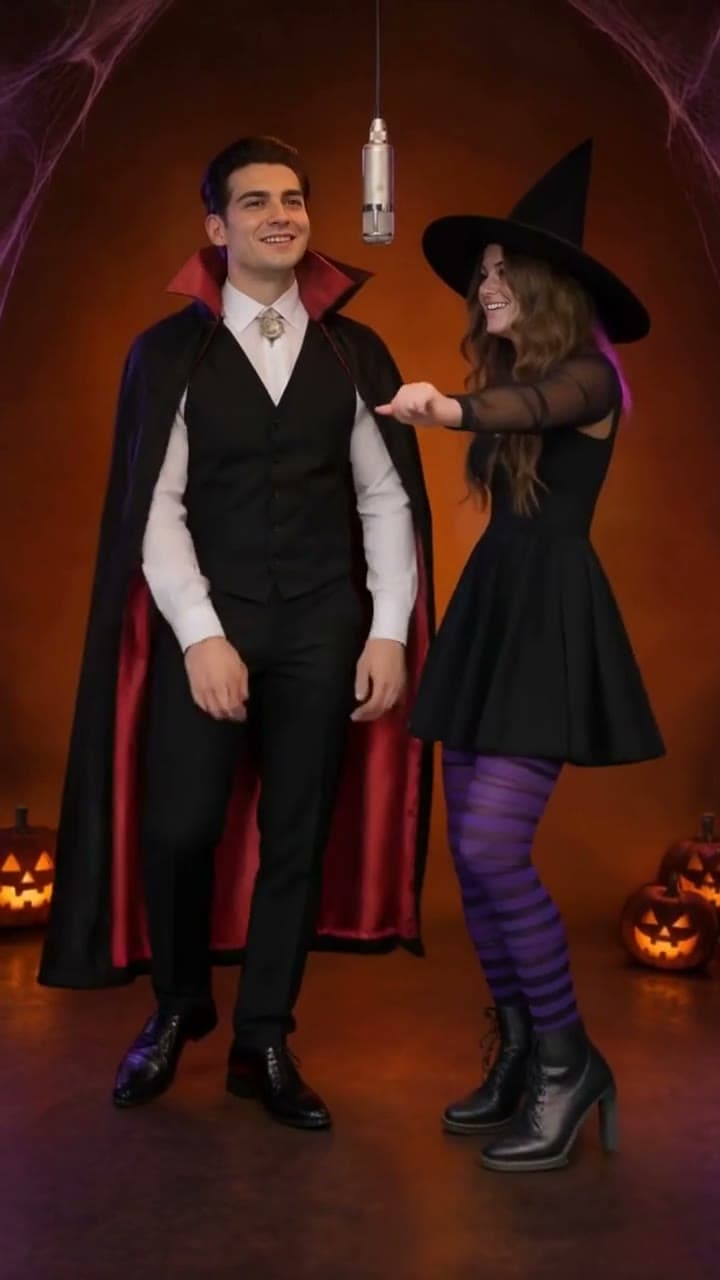
What are the best duo costumes for a Hotel Lobby AI video?
The best Halloween Hotel Lobby AI costumes are pairs that read in one second, because the video is only 15 seconds and both of you are on screen the whole time. These 12 duos work well side by side.
- Vampire and victim. One looks hungry, one looks nervous, and the contrast carries the whole clip.
- Frankenstein's monster and the Bride. The classic horror couple, instantly clear even in a small vertical frame.
- Witch and black cat. Works for two people, or for a person and an actual cat.
- Angel and devil. White on one side, red on the other, so the left-right split does the joke for you.
- Ghost and ghost hunter. A sheet-style ghost and someone in a jumpsuit with a gadget; keep the ghost's face showing.
- Zombie and survivor. Torn clothes and fake blood next to someone who looks like they have not slept in days.
- Mummy and archaeologist. Bandages next to a khaki explorer outfit, a pairing that still reads at phone size.
- Skeleton twins. Matching skeleton suits make the two of you look like a real duo act.
- Werewolf and full moon. One wolf, one person dressed as a glowing moon, and plenty of room for a joke.
- Pirate and parrot. Great with a small dog or cat in a parrot costume as the second performer.
- Grim reaper and next appointment. One hooded reaper, one person holding a clipboard or calendar.
- Ketchup and mustard. The easy, non-scary option: two bold colors that match each other.
Matching pairs work because the original performance is a duo act. The audience should see you two as a team the moment the clip starts.
How do you make a Halloween Hotel Lobby AI video?
Making a Halloween Hotel Lobby AI video takes 4 steps once you pick the Halloween booth, and the video is ready in about 6–8 minutes after you pay.
Pick Halloween, then upload two photos
On the home page, choose Halloween instead of Original. Photo 1 stands on the left and photo 2 on the right; use the swap button to switch them before paying. JPG, PNG, WebP and HEIC all work.
Pay with your email
Enter your email, then pay $9.99 by card, Apple Pay or Google Pay. No account or password needed.
Wait about 6–8 minutes
You can close the page. We email you when the video is ready. If it fails, we retry once automatically, and you can try again for free.
Download and post
Download the 15-second MP4 from My videos. There is no watermark, and the video stays in My videos for 30 days.
Making videos for a whole group? A 3-pack is $19.99 ($6.66 each) and a 5-pack is $29.99 ($6.00 each). One credit makes one video, each video can use a different pair of photos, and credits never expire, so leftovers still work in the Original booth after Halloween.
Which costume photos work best?
For a Halloween Hotel Lobby AI video, the face in your photo matters more than the costume. Makeup and masks change the face the AI sees, so plan your photo around that.
- Keep most of the face visible. A mask that covers most of your face gives the AI little to recognize you by, and the result may look like a stranger.
- Take a mask-up shot. If your costume has a mask, shoot one photo with it pushed up on your head or held in your hand.
- Go lighter on face paint. Heavy full-face makeup can change your features in the video. Partial makeup, like a few stitches or fangs, keeps you recognizable.
- Show the whole costume. A half-body or full-body photo gives the AI the outfit, not just the face.
- Use good light. Take the photo in daylight or a bright room. Dark party photos lose detail.
- One person per photo. Crop out other guests, or the AI may borrow the wrong face.
- Pets: face uncovered. Hats and capes are fine, but the eyes and face should be clear and facing the camera.
Only upload photos of people who are happy to be in the video. You confirm you have permission from everyone in the photos before you upload.
When should you post your Halloween video?
A Halloween Hotel Lobby AI video is ready about 6–8 minutes after payment, so you can make it the same day you post. In 2026, Halloween falls on a Saturday.
Posting in the days before October 31 gives your video more days in people's feeds while Halloween is still on their minds. Shoot your costume photos at a fitting or a pre-party, make the video that night, and post it while the costume is still news.
Your video stays in My videos for 30 days, and we email you before it is deleted. Download it to your phone as soon as it is ready. If TikTok or Instagram mutes the post, re-post with the sound from their music library.
Questions
Is there a Halloween version of Hotel Lobby AI?
Yes. Hotel Lobby AI Studio has a Halloween booth: a darker, Halloween-themed version of the booth with the same hanging mic and two-person framing. Pick Halloween instead of Original before you continue.
Can I wear a mask in my Hotel Lobby AI photo?
You can, but a mask that covers most of your face leaves the AI little to work with, and the result may not look like you. Masks pushed up on the head or half-masks are safer choices.
Can I use my pet in costume?
Yes. Hotel Lobby AI Studio accepts photos of people or pets. Pick a photo where your pet faces the camera and the costume does not cover its face.
Is the Halloween booth the same price?
Yes. A Halloween video costs the same $9.99, or one credit from a 3-pack ($19.99) or 5-pack ($29.99). There is no subscription.
How long is the Halloween booth available?
The Halloween booth is available all year, next to the Original booth, at the same price. Videos you make stay in My videos for 30 days.